
Where AI Can Help with Routine Business Reporting
Use AI for draft summaries and structured reporting, with verified calculations and a clear review process.

AI can help draft reporting commentary, organize notes and explain verified figures, but it needs a defined task and a human review step. Keep the source records and calculation method clear. Begin with a small reporting task where you can check the result against known inputs.
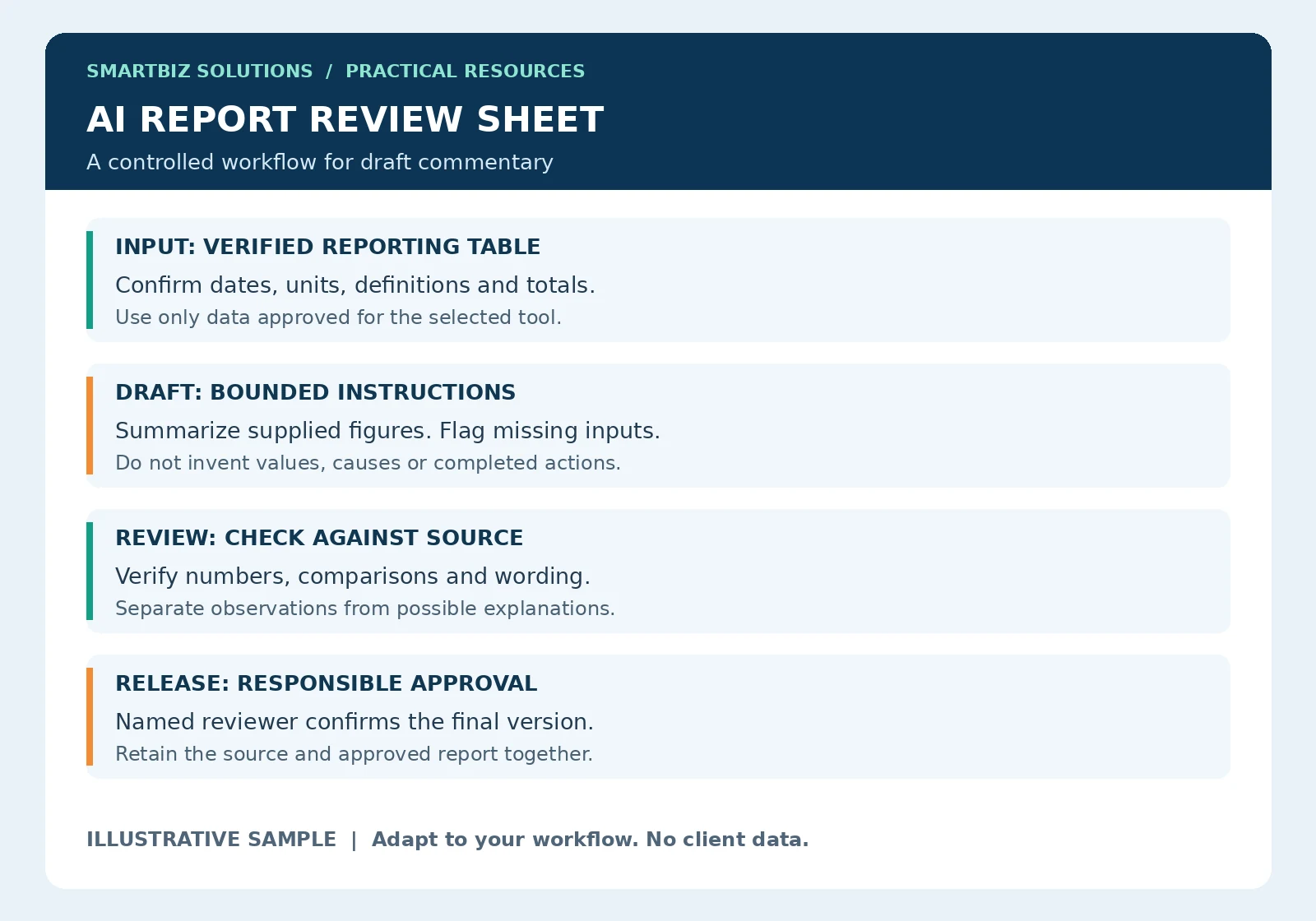
Use the sample as a starting structure. The explanations below show how to adapt it to a real workflow. All numerical examples are illustrative.
Use the sample review sheet as a handover record
The sample separates four stages: input, draft, review and release. This prevents a draft being mistaken for an approved report. Record the source period and version at the input stage, then identify the person who checks the generated commentary before it is shared.
You can keep a short review record containing the report name, source reference, tool used, reviewer, corrections and approval date. The detail should fit your business process. Avoid keeping extra copies of confidential inputs merely to make the review record look comprehensive.
Worked example: a useful summary versus an invented explanation
Imagine a verified table showing 120 completed requests in one week and 108 in the next. A draft may correctly state that completed requests decreased by 12, or 10%, using the first week as the comparison base. The calculation still needs checking. It cannot establish that staff performance deteriorated, because workload, request complexity and other conditions are not supplied.
Ask the draft to list questions instead: Was incoming work different? Were working days comparable? Did the mix of requests change? A useful report distinguishes what is observed from what must be investigated. Add an explanation only when an accountable person can support it with evidence.
Choose a limited pilot and a fallback
Start with an earlier report for which the accepted figures and final commentary already exist. Use a permitted sample to assess whether the AI-assisted draft preserves dates, units and meaning. Compare the time spent preparing and checking it with the existing workflow.
Define what happens if the tool is unavailable or the draft fails review. The fallback might be the existing report template and manual commentary. Keep that route usable until the new workflow has demonstrated acceptable performance. Do not promise savings before measuring preparation, checking and correction effort together.
Separate calculations from commentary
A monthly report often combines collecting data, checking totals, preparing charts and writing explanations. These are different tasks. Use dependable spreadsheet formulas, queries or reporting tools for agreed calculations. AI can assist with drafting the narrative around those verified results.
A fluent explanation can still contain incorrect figures or an unsupported reason for a change. Do not treat confident wording as evidence that the underlying analysis is correct.
Useful starting tasks
- Draft summaries: Turn a verified KPI table into a short first draft for review.
- Organize notes: Group operational updates under headings such as completed work, open issues and next actions.
- Improve wording: Make a report clearer without changing its figures or meaning.
- Prepare a structure: Suggest headings and a reporting checklist for a recurring management update.
- Identify questions: List missing information or points requiring investigation rather than inventing answers.
Example: a weekly operations summary
In an illustrative workflow, a manager first checks a table of workload, completed items and overdue items. The table includes dates and metric definitions. An approved AI tool receives only the information necessary to draft a summary. The manager then checks every figure and proposed statement before the report is shared.
If overdue items increased, the draft may describe the increase. It should not invent a staffing problem or system failure as the cause. Reasons require supporting evidence from the team or source records.
A practical instruction for the first draft
Try this instruction with an approved, non-sensitive sample: “Using only the verified table below, draft a short weekly summary. State the reporting dates, changes in the supplied measures and questions needing review. Preserve units and metric names. Do not infer causes, create missing values or invent actions already taken. Label any missing information.”
The instruction sets boundaries; it does not guarantee compliance. Review the output against the source even when the draft appears straightforward.
Protect the information you use
Before using an external tool, confirm that your organization permits the tool and the specific data involved. Remove unnecessary personal details, credentials and confidential material from initial samples. Data retention, access controls and service terms vary, so the approved handling process should be agreed before operational use.
Review before publishing
- Compare every number, date, unit and category against the approved source.
- Check percentages, denominators and period comparisons independently.
- Separate observations from explanations and proposed actions.
- Confirm that missing information remains visible.
- Have a responsible person approve the report and retain the relevant source version.
Test whether the workflow is worthwhile
Run a limited trial using previous reports and known answers. Record preparation time, review time and the corrections needed. Judge the complete workflow, including checking and rework, rather than only how quickly a draft appears. If review takes longer or errors remain difficult to detect, simplify the task or keep it manual.
NIST’s generative AI risk profile discusses risks including confabulation and data privacy. For reporting, these are reasons to verify generated statements and control which inputs enter a tool. This article offers a practical workflow, not a claim that any tool is suitable for every business.
Frequently asked questions
Can AI automatically publish our management reports?
A draft-generation feature alone does not provide a reliable publishing process. Any automation needs agreed data sources, validation, access controls, exception handling and an approval arrangement appropriate to the report.
Can AI explain why sales or productivity changed?
It can suggest questions and possible explanations, but those explanations need evidence. A pattern in a table does not by itself establish a cause.
Start with a reviewed sample
SmartBiz Solutions supports data analysis and practical AI-assisted workflows. For consistent source data and repeated monitoring, explore MIS reporting support. Record responsibilities through process documentation.
Discuss a reporting workflow on WhatsApp · Get free editable templates and use the reporting-time calculator · Back to Insights
Further reading: NIST: Generative Artificial Intelligence Profile.