
How to Write an SOP for a Small Business: A Practical Guide
Start with one recurring task. Learn what to include in a practical SOP, test it with your team and keep responsibilities, checks and records clear.

A practical SOP helps a small business repeat important work consistently when an experienced person is unavailable. It records the trigger, responsible role, steps, checks and evidence needed to complete a process. Start with one recurring task where missed steps cause delays, rework or repeated questions.
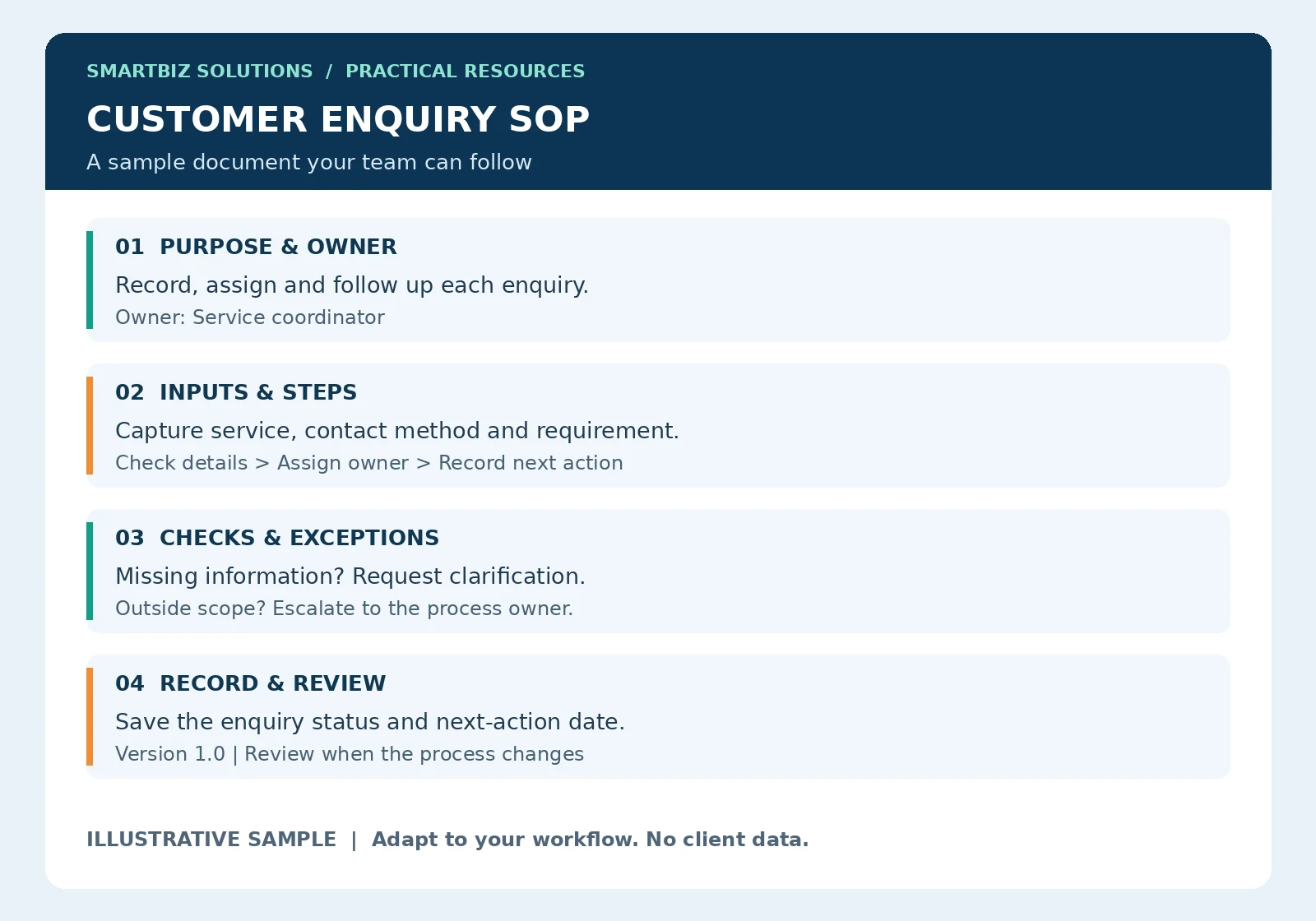
Use the sample as a starting structure. The explanations below show how to adapt it to a real workflow. All numerical examples are illustrative.
How to use the sample SOP
The sample above shows the structure for an enquiry process. Treat each row as a prompt for a discussion with the person doing the work. For purpose and ownership, name the outcome and the role accountable for it. For inputs, record which details are needed before a request can move forward. For exceptions, identify who can decide what to do when information is missing or the request falls outside the normal service scope.
For example, “follow up with the customer” is incomplete. A usable instruction states which role follows up, where the next-action date is recorded and how an unanswered enquiry is escalated. Your business must agree those details; copying another team’s timings may create promises your staff cannot meet.
Turn general instructions into observable steps
Replace vague verbs such as “handle properly” with actions that can be checked. “Record the enquiry date, service requested and responsible person in the tracker” tells the user what completion looks like. Put detailed system instructions in a separate work instruction if they would make the main procedure difficult to read.
Keep responsibilities attached to roles rather than individual names where practical. Staff may change while the role continues. If one person holds several roles, record that arrangement in the team’s responsibility list and confirm who provides cover during absence.
A practical first-week rollout
Walk through the draft with the process owner, then test it against a routine enquiry and an exception. Ask a colleague to use it without verbal coaching. Record questions they ask, revise the unclear steps and confirm the forms and system permissions are available.
After approval, explain the changes to affected staff and remove outdated working copies from routine use. Review missed fields, overdue actions and repeated questions during the first week. These observations help distinguish a training gap from an instruction that needs rewriting. Keep the review proportionate to the process.
What is an SOP?
A Standard Operating Procedure explains how a defined process should work. A work instruction describes the detailed steps for a specific task. A checklist helps someone confirm that required checks have been completed. A business may use all three, but each document should have a clear purpose.
Why businesses become dependent on one person
In a small team, important details often live in conversations, personal notes or one employee’s memory. That person may know which customer details to collect, who approves an exception and where records are saved. When they are absent, colleagues must guess or wait.
Documentation can make that knowledge easier to share. It works best alongside training, access to the right tools and a named process owner. A document alone cannot resolve understaffing, unclear authority or unreliable systems.
Choose your first process
List three tasks that happen regularly. For each, ask: does the team repeatedly seek clarification, miss information or redo the work? Choose one process with a clear start and finish, such as handling a customer enquiry, preparing a weekly report or handing over a shift.
Avoid starting with a manual covering the whole business. A short, tested procedure for one real task is easier to review and maintain.
A simple SOP structure
- Purpose and scope: Explain the outcome and where the procedure applies.
- Trigger and inputs: State what starts the task and which information is required.
- Responsible roles: Name who performs, checks and approves the work.
- Steps: Put actions in the order they happen, including decision points.
- Checks and exceptions: Explain what to verify and who handles missing information or unusual cases.
- Records: State what evidence is retained and where it belongs.
- Document control: Record the owner, version, approval date and review arrangements.
Example: handling a new customer enquiry
The following is an illustrative workflow, not a report of a client project. Adapt it to your actual staffing, systems and response commitments.
- Record the enquiry date, contact method, requested service and customer’s stated requirement.
- Check whether the information is sufficient for the next discussion. Ask for missing details through the agreed contact method.
- Assign the enquiry to a responsible person and record the next action and due date.
- Acknowledge receipt using an approved message that explains the next step.
- Escalate requests outside the agreed service scope or approval authority.
- Update the status after each meaningful action and retain the relevant record in the agreed location.
The procedure should define who owns each step. If an enquiry tracker is used, its status labels should match the procedure so the document and daily records support each other.
Test the SOP before approving it
Ask a colleague who did not write the document to follow it using a realistic sample. Observe where they need extra explanation. Check whether the required access, forms and approvals actually exist. Revise unclear steps, then have the process owner confirm the final version.
Keep one controlled working copy accessible to the team. When a process changes, update the document and tell affected users what changed. Review recurring errors and missed records to identify where the instructions or working arrangements need improvement.
How to assess whether it is helping
Choose measures that fit the process: missing-field counts, overdue follow-ups, repeated corrections or time spent preparing a recurring report. Use consistent definitions and compare similar periods. Record other changes that may affect the result; an improvement after introducing an SOP does not by itself prove the SOP caused it.
Frequently asked questions
Does a small business need a long SOP manual?
No. Begin with the process that needs the most clarity. Add detail only where users need it to carry out the task, make a decision or retain a record.
Who should approve an SOP?
The person authorized to own the process should confirm its accuracy and feasibility, with any additional approvals your business requires.
Can an SOP replace staff training?
No. Use it as a reference during training and daily work. People still need practice, suitable access and a route for asking questions.
Start with one process this week
Choose a recurring task, identify its owner and draft its steps and checks. Test it with a colleague before expanding to another process.
SmartBiz Solutions provides SOPs and process documentation for agreed business requirements. If you also need repeatable monitoring, explore MIS dashboards and automated reports.
Discuss your process documentation requirement on WhatsApp · Get free editable templates and use the reporting-time calculator · Back to Insights & Resources